Lighting control technology has evolved from analog to digital technology with a focus on smarter, sustainable, human-centered lighting solutions.
Learning objectives
- Recognize how advanced lighting control systems have created usability challenges.
- Evaluate how UI/UX design techniques can be used to develop and improve lighting control systems.
- Perform a cognitive walkthrough to evaluate a lighting control system design.
Lighting control insights
- Advanced technology and lighting design does not ensure user-friendly lighting control interfaces.
- Borrowing from the fields of user interface and user experience design, a deliberate focus on intuitive lighting control system design ensures all users can easily navigate and benefit from modern lighting systems.
The impact of lighting goes far beyond just making the built environment visible. It plays a crucial role in shaping experiences, affecting moods and improving the functionality of the spaces people occupy. Effective lighting boosts safety, productivity and overall well-being.

Likewise, lighting control systems play a significant role in user satisfaction with lighting systems and the built environment, more broadly. Developing technologies such as internet of things and artificial intelligence offer new opportunities for smarter, human-centered solutions.
At the same time, the advanced functionality of lighting control systems with highly nuanced automation and personalization features can make systems less intuitive for users and pose challenges for learning and usability.
For everyone to benefit from modern lighting controls systems, it is critical that designers develop user-friendly lighting control interfaces. Adding deliberate steps to review and refine the lighting control design can help to ensure intuitive lighting control solutions that satisfy end user requirements.
Evolution of lighting control technology
Lighting control technology has evolved rapidly from its modest beginnings in the 19th century. From simple switches and rheostat dials to the touchscreen and voice activated interfaces available, these changes have dramatically transformed the flexibility, efficiency and customization of building spaces in ways once thought impossible. The transition from analog to digital systems in the late 20th century marked a significant shift in lighting control technology. Digitalization enabled more complex data exchange, enhanced sensor functionality, centralized control and improved wiring efficiency.
Lighting control systems are currently moving toward greater integration, automation and data-driven approaches. These “smart” systems use varied communication networks, software defined features and integration with building management systems to provide highly granular control and increased resilience. Advanced automated functions offer the potential to improve building performance and change how occupants interact with lighting control systems.
With this great possibility comes a risk that designers lose sight of the defining purpose of a lighting control system: to provide occupants control over the lighting system and their environment. Designing a system with advanced control functionality without leaving users behind is a formidable challenge that grows with the proliferation of new capabilities.
Lighting control design
Lighting systems in large multifunctional facilities often require complex lighting controls that accommodate a variety of users with differing goals. In a hospital room, for example, patients, families, nurses, physicians, cleaning staff and maintenance personnel all need some level of control over the lighting. Each user group has distinct priorities, needs and varying levels of familiarity with available functions.
While there is still ample room for innovation, digital lighting control systems offer all the tools the designer needs to meet code requirements while tailoring the user interface to more closely align with the unique needs of the occupants. For example, modern touchscreen and mobile device interfaces can accommodate multilayer menus, custom graphics, location tracking, floor plans, secure user profiles and much more.
The difficulty lies in harnessing those capabilities to provide a system that allows anyone to achieve the lighting condition they need with minimal experience. Put another way, achieving intuitive and energy-efficient lighting control systems is not primarily a technology problem but rather a design and implementation problem.
How can we ensure that lighting control systems remain intuitive for all, while still delivering the advanced functionality required by the application? One approach is to borrow from a field that has long addressed similar challenges: user interface (UI) and user experience (UX) design. UI/UX designers create systems that support complex tasks by offering clear, intuitive choices tailored to the user’s needs. UI and UX need to work in harmony to ensure the process of interacting with technology is user-friendly, functional, intuitive and, ideally, even enjoyable.
One UX/UI design technique for evaluating the intuitiveness and learnability of an interface for different user types is called a cognitive walkthrough. The process is used as a means of testing and refining a prototype system design and involves listing all relevant user types (personas) and systematically walking through the main tasks each user would likely need to perform from their perspective, noting any unintuitive or overly complex steps. Designers then revise the system to simplify these interactions and enhance usability.
The process of cognitive walkthroughs can provide a deliberate quality control measure that reviews the alignment between the lighting control system and the lighting design parameters as well as users’ lighting control needs.
Lighting designers and engineers often perform this kind of analysis informally or subconsciously and consideration of the users and tasks within a space is central to the design process. However, for particularly complex systems designed for use by people unfamiliar with system functions, a more deliberate review may be beneficial.
Optimizing lighting control systems and making them more user-friendly can ultimately yield benefits for both the occupants and the facility. Users directly benefit from a more enjoyable, seamless experience while feeling empowered to adjust the lighting to their own needs and preferences without frustration or asking for help. An intuitive lighting control system increases the likelihood that lights will be turned off when not needed or dimmed when full brightness isn’t necessary, saving energy and extending the usable life of fixtures.
Optimizing lighting control interfaces for users
A cognitive walkthrough can be an effective tool to refine complex lighting control applications with the primary goal of simplifying and streamlining the user experience. It is important to note that the cognitive walkthrough is a means of evaluating and streamlining the system and does not represent the entirety of the design process.
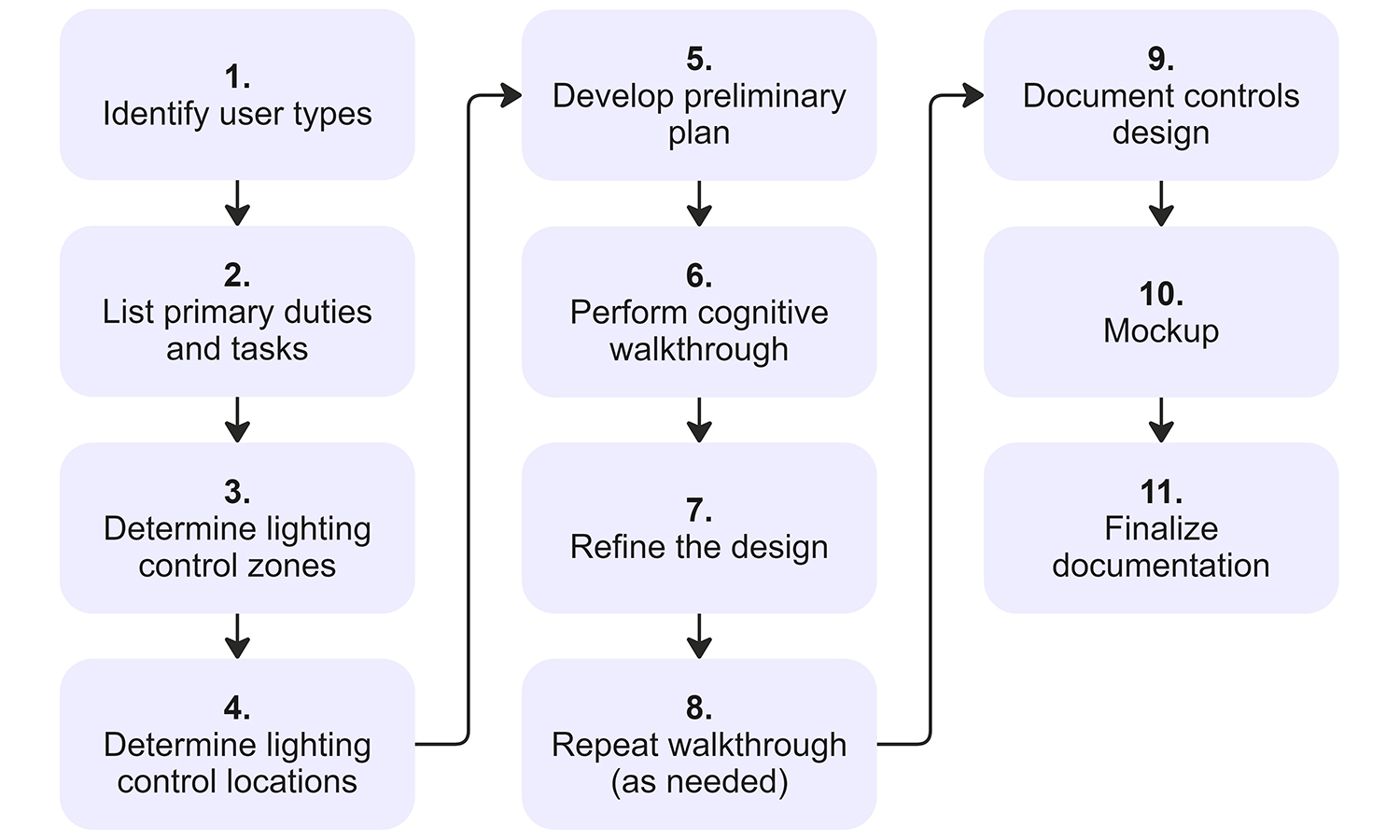
Project parameters such as anticipated tasks and user types should be established very early in design — in conversation with design partners and the owner/end user — to ensure that the designer’s understanding of the space is accurate and complete. These parameters should be thoroughly documented in a narrative format, as they will influence the lighting and lighting control designs. As shown in Figure 1, these steps build upon the parameters of the lighting design process and support a user-experience lens, to guide the lighting control design.
The steps include:
List user types: User types must accurately represent all users who require control over lighting to perform tasks within a space; these can be established through research, experience and discussions with space planners and, ideally, end users.
Additionally, designers should understand whether the user type is familiar or unfamiliar with the space. Familiar users spend a significant amount of time in the space or use it repeatedly. It is assumed they have had time to learn how lighting works in the space and where the lighting controls are located. These users may be more interested in personalizing the environment to their specific needs, mood, comfort and preferences throughout the day.
Unfamiliar users are assumed to have no pre-existing knowledge of the lighting “layers” or zones in the space, where the controls are located or whether controls are available to them. As a result, they may be overwhelmed by a system that does not replicate the switches and dimmers they have in their typical home environment. Automatic controls or simple, easy-to-find, easy-to-adjust controls (e.g., on/off, slide dimmers, motion sensors) are often best to accommodate their needs and goals.
List the primary duties and tasks to be performed: Throughout the design, it is necessary for the designer to anticipate the duties and tasks the users need to carry out within the space. Create a list of tasks, sorted by importance and frequency; critical life-safety tasks rank the highest, followed by the most performed tasks. For spaces with different user types, duties and tasks need to be assigned separately to each user category to determine how they might benefit from lighting controls.
Patient rooms, for example, serve a range of users, including patients, nurses, visitors and other staff. Each user’s tasks vary, with different types of controls benefiting different users. Nurses require lighting controls to support care and documentation tasks, while patients benefit from controls that make it easier for them to rest and attend to their individual needs.
Determine lighting control zones, select optimal locations and develop a preliminary plan: After determining the tasks for each user type, the designer should identify which lighting fixtures need to be controlled to perform those tasks and create the associated control zones to accommodate them. Fixtures are grouped within these zones, providing a single point of control for multiple lights and the customization of lighting within an area to suit specific preferences or activities.
The lighting controls should be optimized for each user group by identifying which locations in the space are most intuitive and accessible when the space is used as anticipated. Any tasks that do not have distinct lighting requirements should be controlled together.
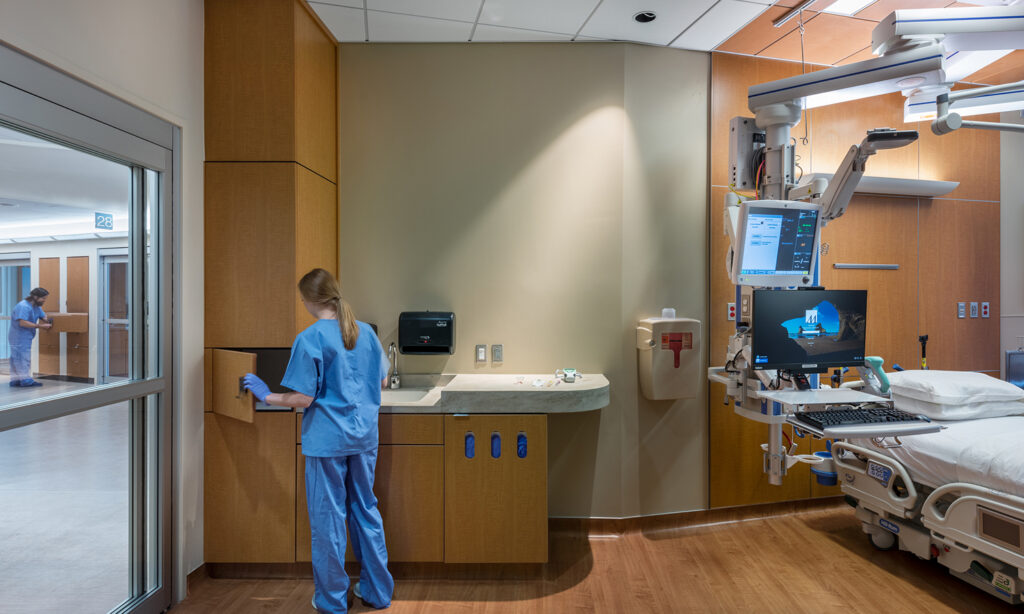
Returning to the patient room example, most users, aside from staff who regularly visit the room (e.g., unit nurses), would be relatively unfamiliar with the space (see Figure 2). Critical duties and safety would therefore require light switches to be placed near the door where they are immediately accessible and easily found. When thinking about individual user types, patients may benefit from controls near the bed and outside the bathroom, while nurses may benefit from task lighting controls at work zones in the room.
Once the lighting control zones are determined and the control locations are optimized based on users’ duties and tasks, a preliminary lighting control plan can be developed. This involves sketching out control locations, zones and functions, such as switches and dimmers. Each control interface is mapped, minimizing the number of buttons, sliders or other interface components. Controls should still enable the required functionality while remaining intuitive for unfamiliar users.
To the extent possible, interface components should be arranged from top to bottom, from large to small and from left to right, in order of importance and frequency. Labels must be as universally comprehensible as possible, using color and/or icons to increase understandability. Now that a prototype control design has been established, it can be further refined via the cognitive walkthrough.
Perform a cognitive walkthrough and refine the design: To ensure a user can control the lighting in a way that supports their tasks and its location within the room, a careful walkthrough of the task steps and user movements needs to be performed. Consideration must be given to every part of the task, minimizing assumptions about what the user knows and accounting for users who may have never interacted with a commercial lighting control system.
During the walkthrough, any pain points or inefficiencies in performing the designated tasks must be noted, such as needing to walk across a dark room or get out of bed. Designers should ask:
- Does the user know they can control the lighting?
- Is the user able to see the lighting control device?
- Are lighting controls for the most frequent and important tasks the most visible and easiest to reach?
- Will users intuitively understand how a device controls the lighting? Perhaps the right button is visible, but will users understand the label and know how to engage with it?
- Will users be able to see that something is happening once an action is performed? For example, a very slow fade-on of a light across the room might not provide sufficient visual feedback for the user to immediately notice a change. In this case, they may think their interaction was ineffective and might try something else, potentially interrupting the change they set out to achieve in the first place.
Document and mock-up the design: Once the lighting control design has been thoroughly optimized, the design documentation can be formalized. This includes documenting device locations shown in plan and elevation, planning for device labels and editing the control narrative and control system specifications. Before the finalization of the controls design, the lighting controls can then be further confirmed and tested through a mock-up.
Mock-ups bring the design to life, helping ensure that control system specifications are correct, anticipate potential roadblocks and improve the owner’s understanding of the detailed operation of the user interfaces. This is particularly helpful if there are specific user requirements related to graphics visibility or control device functionality, as there is no substitute for a realistic visual representation of the final product.
Finalize documentation: Any feedback resulting from the mock-up and review of the documentation must be incorporated prior to finalization of the control design documentation for construction. In these later stages of project documentation and even during construction, small shifts and changes may be required due to coordination or field conditions and the original design intent can sometimes be lost. In such cases, revisiting and repeating the cognitive walkthrough as a quality control check can help ensure that all users can still access and manipulate the lighting controls as intended.